
| Master software performance in just 16 hours! Join our Software Optimization for the Memory Subsystem Workshop taking place from May 18th to May 21st. Click here to express interest or register. |
At Johnny’s Software Lab we’ve spent a lot of time deep-diving into advanced performance topics — vectorization, cache hierarchies, memory bandwidth, you name it. But not everyone is ready to jump straight into assembly listings and microarchitectural details.
This post is for the beginners. For the fresh graduates and junior developers who are just starting to think about performance. These are the things I wish someone had told me early in my career. Consider it a crash course in the fundamentals — practical, opinionated, and grounded in real-world software.
1. Performance Usually Isn’t the First Problem
Most software projects don’t die because they’re “too slow.” They die because the codebase collapses under its own weight — poor design, too much complexity, mountains of technical debt. Performance is nice, but maintainability is what keeps your project alive.
Get the architecture right first. Without that, all the optimizations in the world won’t help you.
2. Sometimes Performance Is the Only Problem
Games, high-frequency trading, real-time video and audio: if you’re in these domains, performance isn’t an afterthought. It’s the essence. From day one you need to:
- Lay out your data structures properly for cache efficiency.
- Pick containers that enable vectorization.
- Be frugal about your memory bandwidth – don’t load the same data twice.
For these systems, “optimizations can wait” attitude is not an option.
3. Big-O Lies by Omission
At university you learn Big-O. Undoubtedly, asymptotic complexity matters — but in practice:
- Quicksort and heapsort are both O(n log n). One is way faster (hint: it’s quicksort, thanks to locality and vectorization).
- For tiny inputs, Big-O is irrelevant. Sorting 4 elements? A sorting network beats quicksort every time. Searching 8 elements? A linear scan smokes a hashmap.
Big-O is a compass, not a stopwatch. Useful, but doesn’t tell the whole story.
4. Profiling Beats Guessing (Always)
Every developer thinks they “know” where the bottleneck is. But many times we are wrong. Measure first. Use perf, VTune, LIKWID, anything.
If you must guess, look at the most nested loops — they tend to hide the real Big-O complexity monsters. But don’t fool yourself: guessing is gambling. Profiling is science.
Do you need to discuss a performance problem in your project? Or maybe you want a vectorization training for yourself or your team? Contact us
You can also subscribe to our mailing list (link top right of this page) or follow us on LinkedIn , Twitter or Mastodon and get notified as soon as new content becomes available.
5. Focus on Hotspots, Ignore the Rest
Your app spends most of its time in a handful of places. That’s where the gold is.
Optimizing code that runs once a second and takes microseconds? That’s vanity programming. Find the hotspots, burn them down, leave the rest alone.
6. std::vector Wins by Default
Unless you have a very, very good reason, use std::vector.
- It’s cache-friendly.
- It grows when needed.
- It avoids memory fragmentation.
Other containers look smart on paper but often crash into the memory wall in practice. Ninety percent of the time, std::vector is the right answer. The other ten percent? You need to sit down and think.
7. Performance vs. Maintainability: Pick Your Poison
The fastest code is can be the ugliest. Hand-tuned vectorization, loop tiling, cache-blocking — these make code harder to read, harder to maintain, and easier to break.
Rule of thumb:
- Make it correct first.
- Make it readable second.
- Only then, make it fast.
And when you do make it fast, keep the simple version around. You’ll need it for debugging when you fail to understand your “genius” optimizations.
8. Throughput vs. Latency: Stop Mixing Them Up
“Performance” isn’t one thing. At least two dimensions matter:
- Throughput: how much work you can do per second.
- Latency: how long one piece of work takes.
Examples:
- Downloading movies → throughput matters (MB/s).
- Playing online games → latency matters (ms).
- Scientific simulations → throughput rules.
- Real-time audio → latency rules.
Different goals require different optimizations. If you don’t know whether you’re fighting for throughput or latency, you’re fighting blind.
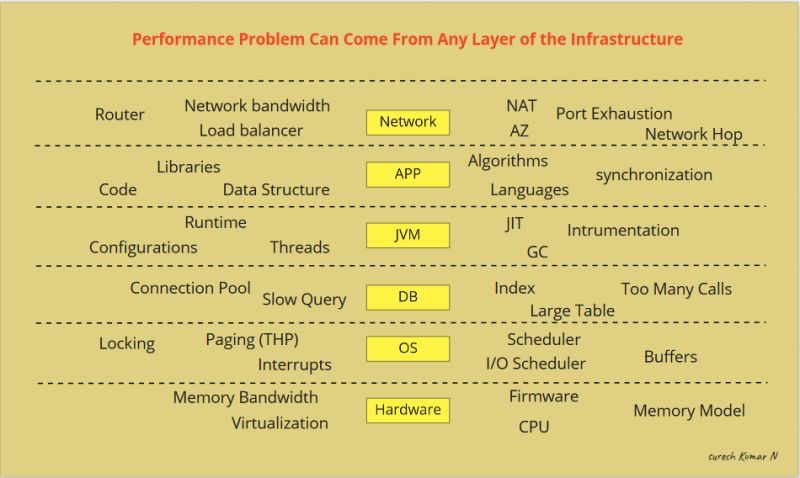
9. There’s Always a Hardware Bottleneck
So, you’ve cleaned up the obvious mess: no redundant calls, no wasted loops, minimum instructions. Great. Now what? The next wall you’ll hit isn’t in your code — it’s in the hardware.
No software is 100% hardware-efficient. Bottlenecks show up everywhere:
- Not enough instruction-level parallelism → CPU sits idle (classic pointer-chasing problem).
- CPU fully utilized → memory bandwidth underused.
- Memory saturated → CPU still waits.
- CPU waits on disk.
- CPU waits on the network.
At every level, something is slower than the rest. That’s why advanced optimizations target hardware utilization — vectorization, cache-aware data structures, memory layout tricks.
Many posts on this blog dive into exactly these topics. And if you want to master them hands-on, check out our courses on vectorization and memory optimizations.
Do you need to discuss a performance problem in your project? Or maybe you want a vectorization training for yourself or your team? Contact us
You can also subscribe to our mailing list (link top right of this page) or follow us on LinkedIn , Twitter or Mastodon and get notified as soon as new content becomes available.
Conclusion
Performance isn’t magic. It’s trade-offs, measurement, and knowing when to care. Get the design right first, profile instead of guessing, optimize the hotspots that matter, and always remember: performance without maintainability is just a very fast way to fail.
Happy Software Optimizations!